|
|
| |
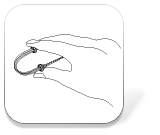
| Step 1 |
| Bend the Lok-U-Plug cable holder as shown in the diagram.
|
|
|
 |
|
| |
 |
|
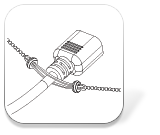
| Step 2 |
| Put the power cord through the middle of the Lok-U-Plug cable holder. |
|
|
| |
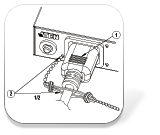
| Step 3 |
- Plug the power cord into the power outlet.
|
- Thread one end of the Lok-U-Plug into the lower left hole of the power outlet.
|
|
|
 |
|
| |
 |
|
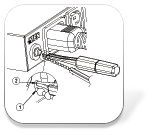
| SStep 4 |
| Use the Lok-U-Plug Installation Tool to secure the cable holder, pushing down so the small part of the chain locks into the small part of the hole.
|
|
|
| |
| Step 5 |
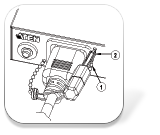
- Push the cable holder as close as possible to the PDU and thread the other end of the chain to the upper right hole.
|
- Use the Lok-U-Plug Installation Tool to secure the cable holder, pushing down so the small part of the chain locks into the small part of the hole.
|
|
|
 |
|
| |
 |
|
| Step 6 |
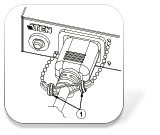
| Push the right and left rings to the middle, ensuring that the power cord is completely fastened, to complete the installation.
|
|
|
| |
| Suggested installation sequence |
- Plug in all the Lok-U-Plugs to the PDU, but only secure to the lower holes.
|
- When you are done with the lower left holes, then secure the upper right holes.
|
 |
|
|





