|
|
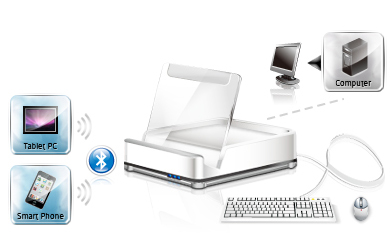
A)1 Computer + 2 Bluetooth Devices (Smart Phone or Tablet PC)
Plug a USB keyboard and mouse into the CS533's rear ports, connect the CS533 to your computer, sync your Bluetooth devices with the CS533, then use hotkeys to switch USB keyboard and mouse use between all your devices. |
|
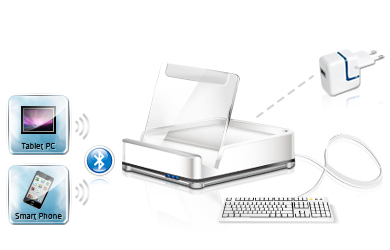
B)2 Bluetooth Devices (Smart Phone and Tablet PC)
Plug a USB keyboard into the CS533's rear port, connect the CS533's USB plug into a USB power adapter, pair the two Bluetooth devices with the CS533, then use hotkeys to switch USB keyboard use between the smart phones and/or Tablet PCs. |
|
|
 |
|
 |
|
|
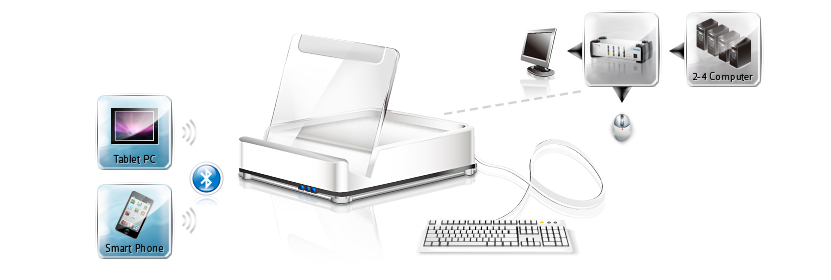
C) 2 Bluetooth Devices + 1 KVM Switch + 2~4 Computers
When used in conjunction with a KVM Switch, the CS533 Tap allows you to access your smart phone, tablet PC, and multiple computers via a single USB keyboard - to boost efficiency with ease. Plug a USB keyboard into the CS533, connect the CS533's USB plug into the USB port of the KVM Switch, connect a monitor and mouse to the console ports of the KVM switch, sync your Bluetooth devices with the CS533, and finally connect the computers to the KVM switch. Now you are ready to work with all the devices together, from a single central keyboard and mouse. |
|
|
|
 |
|