ATEN logo
Home   |   About ATEN   |   Contact Us   |   Partner Center   |   Investor Relation   |   Where to Buy

+ Keyword Search

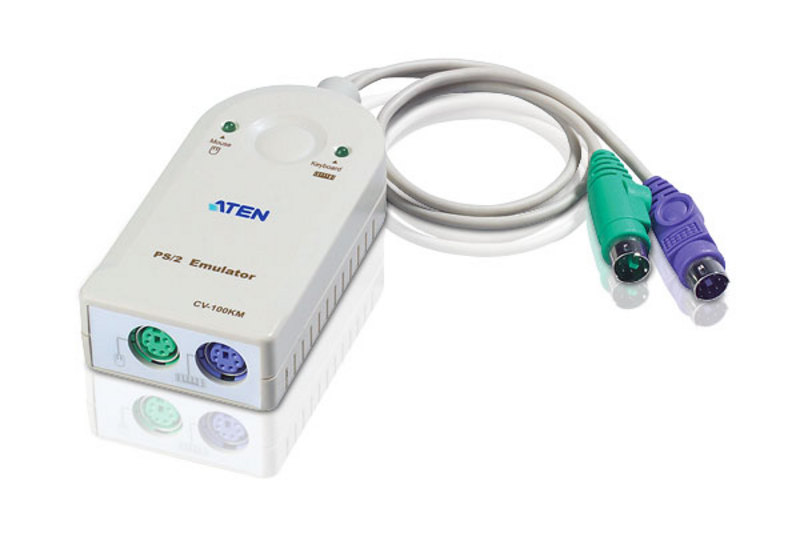
PS/2 Emulator

CV100KM Zoom In

Simply plug the CV100KM into any computer and its onboard microprocessor emulates an actual keyboard and mouse! Operate and boot normally with or without a real keyboard and mouse connected.

 ROHS Weee
Patent No.

US D445092 , US D445764

Package Contents
  • 1x PS/2 Emulator
  • 1x User Instructions

PS/2 Emulator

CV100KM Simply plug the CV100KM into any computer and its onboard microprocessor emulates an actual keyboard and mouse! Operate and boot normally with or without a real keyboard and mouse connected.
  • Ends computer lockup due to loss of KVM focus
  • Prevents computer damage from keyboard failure
  • Hotplugging of keyboard and mouse
  • Keyboardless boot and run
  • Non-powered - uses computer's keyboard power source
  • OS Support: Windows 2000, Windows XP, Linux, FreeBSD

PS/2 Emulator

CV100KM Simply plug the CV100KM into any computer and its onboard microprocessor emulates an actual keyboard and mouse! Operate and boot normally with or without a real keyboard and mouse connected.
CV100KM Diagram

PS/2 Emulator

CV100KM Simply plug the CV100KM into any computer and its onboard microprocessor emulates an actual keyboard and mouse! Operate and boot normally with or without a real keyboard and mouse connected.


Connectors Keyboard Connected to computers 6-pin Mini-DIN Male (Purple)
Mouse Connected to computers 6-pin Mini-DIN Male ( Green )
Keyboard Connected to the Keyboard 6-pin Mini-DIN Male (Purple)
Mouse Connected to the Mouse 6-pin Mini-DIN Male (Green )
LEDs Link 2 (Green)
Environment Operating Temp. 0~50°C
Storage Temp. -20~60°C
Humidity 0~80% RH, Non-condensing
Physical Properties Housing Plastic
Weight 80 g
Dimensions (L x W x H) 8.20 x 5.50 x 2.30 cm
  • * The specification and pictures are subject to change without notice.
  • * All trademarks and logos are the properties of their respective holders.

PS/2 Emulator

CV100KM Simply plug the CV100KM into any computer and its onboard microprocessor emulates an actual keyboard and mouse! Operate and boot normally with or without a real keyboard and mouse connected.


Top
More Product Info Matrix KVM   |   LCD KVM   |   KVM Over the NET™   |   KVM Extenders   |   Rack KVM   |   Cable KVM   |   Desktop KVM   |   Video Switches   |   Video Splitters