- Products
- KVM
-
Desktop KVM Switches
- Cable KVM Switches
- Cat 5 KVM Switches
- Computer Sharing Devices
- KVM over IP Switches
- KVM Extenders
- KVM over IP Matrix System
- LCD KVM Switches / Consoles
- Matrix KVM Switches
- Management Software / Control Center
- Rack KVM Switches
- Remote Control & Monitoring Solutions
- Secure KVM Switches
- Serial Console Servers
- KVM Modules & Accessories
- Accessories
-
CS1762A
- CS1944DPA
- CS1942DPA
- CS1924A
- CS1922A
- CS742H
- CS784H
- CS1942ATC
- CS1924ATC
- CS1922ATC
- US3311
- CM1942
- CS1953
- CS1844
- CS1842
- CS1824
- CS1822
- CS1964
- US3310
- CM1284
- CM1164A
- CS1944DP
- CS1942DP
- CS724KM
- CS1924M
- CS1922M
- CS1914
- CS1912
- CS1922
- CS1924
- CS782DP
- CS1642A
- CS1644A
- CS72U
- CS74U
- CS1782A
- CS1784A
- CS82U
- CS84U
- CS1764A
- CS1792
- CS1794
- CS1732B
- CS1734B
- CS1744
- CS82A
- CS84A
2-Port USB DVI/Audio KVMP™ Switch
CS1762A
- Superior video quality – 1920 x 1200
- Computer selection via front panel pushbuttons, hotkeys, and mouse
- DVI digital and analog monitor support – fully compliant with the DVI specifications
- Multiplatform support – Windows, Linux, Mac, and Sun
- All Features
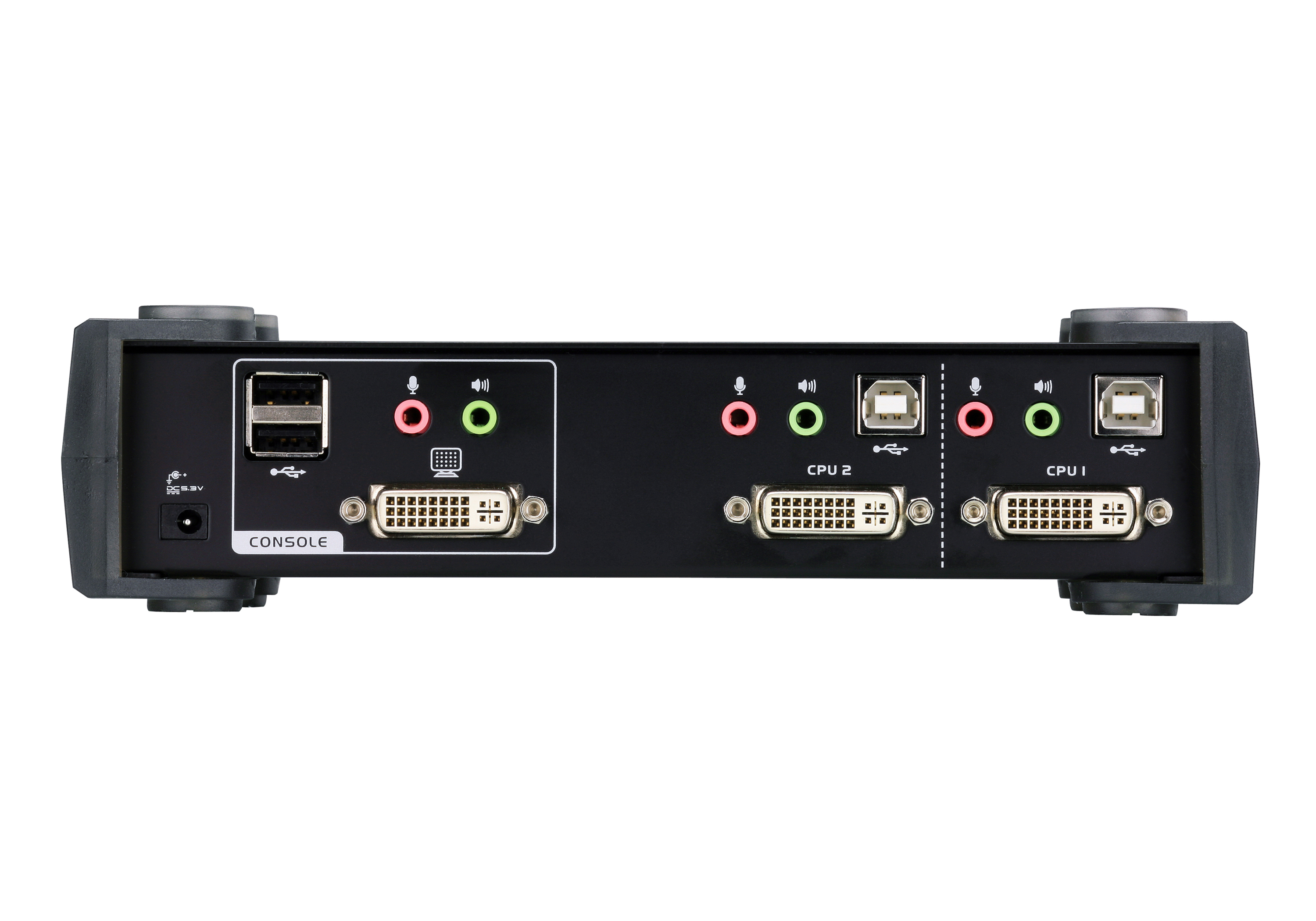
The CubiQ™ CS1762A USB 2.0 DVI KVMP™ Switch charts a revolutionary new direction in KVM (Keyboard, Video, Mouse) switch functionality by combining a 2-port KVM switch with a 2-port USB 2.0 hub at the same time as it provides an interface for a digital monitor (DVI).
In addition, the CS1762A comes with ATEN’s Video DynaSync™ technology, enhancing display resolution, and power-on detection. This means that if one computer is powered off, the CS1762A will automatically switch to the next powered-on computer.
Functioning as a KVM switch, it allows users to access 2 computers using a single USB keyboard, USB mouse, and monitor console. Operating as a USB 2.0 hub, it enables each computer to access peripherals connected to the hub one at a time.
Package Contents
- 1x CS1762A USB 2.0 DVI KVMP? Switch
- 2x KVM Cable (DVI-D, USB, Audio; 1.8 m/6 ft)
- 1x Power Adapter
- 1x User Instructions
- One USB console controls two DVI computers and two additional USB 2.0 devices
- 2-port USB 2.0 hub built in
- Fully compliant with the USB 2.0 specification
- Computer selection via front panel pushbuttons, hotkeys, and mouse
- Audio enabled – full bass response provides a rich experience for 2.1 channel surround sound systems
- Multiplatform support – Windows, Linux, Mac, and Sun
- Supports widescreen resolutions
- Superior video quality – 1920 x 1200
- Independent switching of KVM, USB, and Audio focus
- DVI digital and analog monitor support – fully compliant with the DVI specifications
- HDCP compatible
- Video DynaSync™ – exclusive ATEN technology optimizes display resolution and eliminates boot-up display problems
- Power on detection – if one computer is powered off, the switch will automatically switch to the next powered-on computer
- Console mouse port emulation/bypass feature supports most mouse drivers and multifunction mice
- Complete keyboard emulation for error-free booting
- Mac/Sun keyboard support and emulation*
- Multilingual keyboard mapping – supports English, Japanese, and French keyboards
- Auto Scan Mode for monitoring all computers
- Firmware upgradable
* 1. PC keyboard combinations emulate Mac/Sun keyboards
2. Mac/Sun keyboards only work with their own computer

| Computer Connections | 2 |
| Port Selection | Hotkey, Pushbutton, Mouse |
| Connectors | |
| Console Ports | 2 x USB Type A Female 1 x DVI-I Female (White) 1 x 3.5mm Audio Jack Female (Green) 1 x 3.5mm Audio Jack Female (Pink) |
| KVM Ports | 2 x USB Type B Female 2 x DVI-I Female (White) 2 x 3.5mm Audio Jack Female (Green) 2 x 3.5mm Audio Jack Female (Pink) |
| Power | 1 x DC Jack |
| USB Hub | 2 x USB Type A Female (rear panel) |
| Switches | |
| Selected | 2 x Pushbutton |
| LEDs | |
| USB Link | 2 (Green) |
| On Line /Selected | 2 (Orange) |
| Emulation | |
| Keyboard / Mouse | USB |
| Video | 1920 x 1200 @ 60Hz |
| Scan Interval | 1–99 seconds (default: 5 sec.) |
| Power Consumption | DC5.3V:3.78W:43BTU/h Note: ● The measurement in Watts indicates the typical power consumption of the device with no external loading. ● The measurement in BTU/h indicates the power consumption of the device when it is fully loaded. |
| Environmental | |
| Operating Temperature | 0 - 50°C |
| Storage Temperature | -20 - 60°C |
| Humidity | 0-80% RH, Non-condensing |
| Physical Properties | |
| Housing | Metal |
| Weight | 0.73 kg ( 1.61 lb ) |
| Dimensions (L x W x H) | 21.00 x 8.80 x 5.55 cm (8.27 x 3.46 x 2.19 in.) |
| Note | For some of rack mount products, please note that the standard physical dimensions of WxDxH are expressed using a LxWxH format. |
User Manual
| File Name | Release Date |
| cs1762a-cs1764a_um_w_2020-11-05.pdf (1.64 MB) | 2020-11-05 |
Quick Start Guide
cs1762a_1764a_kvm switch_qsg.pdf (4.26 MB)CAD Drawing
CS1762A-ASM-V02_WEB.pdf (78.17 KB)Firmware
| Description | Ver. | Release Date | File Name |
| Firmware Upgrade | v1.3.124 | 2026-02-10 | cs1762a-v1.3.124.zip |
| Firmware Upgrade | v1.3.123 | 2025-04-23 | cs1762a-v1.3.123.zip |
| Firmware Upgrade | v1.3.122 | 2025-03-04 | cs1762a-v1.3.122.zip |
Note : For requests regarding firmware versions older than 3 years, please contact the Technical Support team.

Compatible Products View All
Note :
All products listed above have been verified for full compatibility with their intended use, where applicable (e.g., keyboard/video/mouse compatibility with KVM switches and extenders).
For any further functionality inquiries, please visit the Support Center for assistance.
Compatible Cables View All
CS1762A
ATEN KVM over IP Solutions Online Trial
PRODUCT ADDED TO CART